Tell it what to automate.
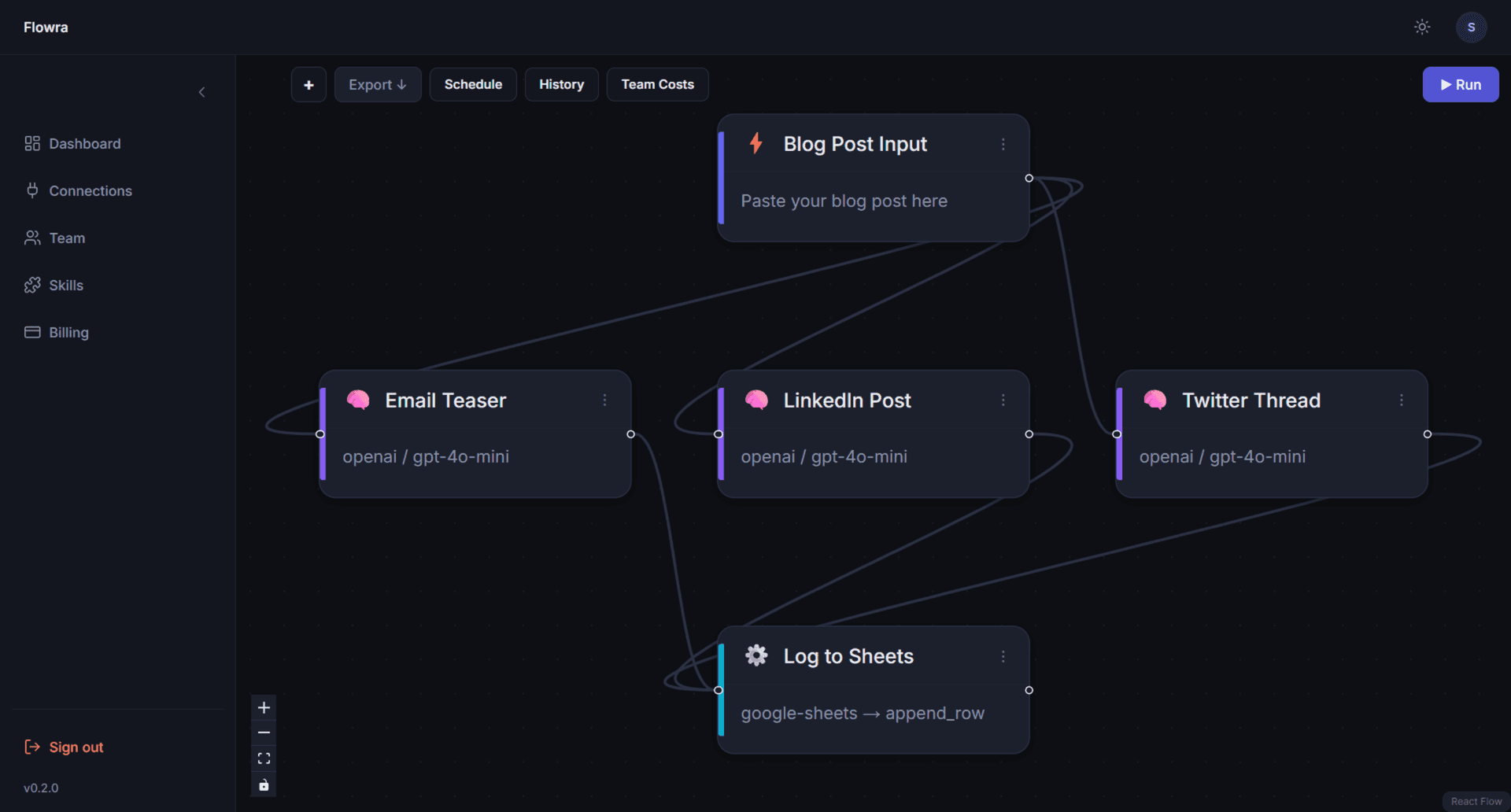
Watch the flow appear.
Describe your workflow in plain English. Flowra builds it as a living, visual canvas — ready to run in seconds.
You already use AI. You just use it in 6 different tabs.
You copy output from ChatGPT and paste it into Claude.
You copy that output and paste it into a Google Sheet.
You do this every day. By hand. Like it's 2019.
You've heard of n8n. You opened it once.
You closed it after 20 minutes.
There's a better way. Just describe it.
Three steps. The last one is just watching.
Describe what you want
Type it in plain English — "summarise my emails every morning and post to Slack" or "take a blog post and turn it into a Twitter thread, LinkedIn post, and email draft." Flowra builds the flow. You don't touch a single node.
Connect your keys
Your OpenAI, Anthropic, Grok, or any other API key. We never sit in between. We never mark up your costs. Not by a cent. Tool connections (Gmail, Slack, Notion, Google Sheets) connect with one click.
Hit run
Watch your data move through the canvas in real time — nodes light up, results arrive, the canvas breathes — nodes react, edges animate, panels slide — because software should feel alive.
Not sure what to describe? Pick one of ready-made templates and run in 60 seconds.
Or skip the blank page — start with something that already works.
Daily Digest
productivityReads your last 10 emails and today's top headlines, then posts a clean summary to Slack — every morning, automatically.
Needs: Gmail · Slack · any LLM
Use this template →Cold Outreach Personaliser
salesPaste a prospect's LinkedIn summary and get a personalised cold email plus a two-step follow-up sequence, saved as Gmail drafts.
Needs: any LLM · Gmail
Use this template →Blog Post Repurposer
contentPaste your blog post and get a Twitter thread, LinkedIn post, and email teaser — all ready to copy-paste, plus logged to Google Sheets automatically.
Needs: any LLM · Google Sheets
Use this template →Not another workflow tool with AI bolted on.
Four things no competitor does all at once:
Describe it, don't build it
Type what you want. Flowra generates the canvas. You can edit every node if you want to — or just run it as-is.
Your keys. Your costs. Zero markup.
Every flow runs on your own API keys. We pass costs through at face value. The price shown on every template (~$0.003–0.008/run) is what you actually pay your provider. We make nothing on your API usage. Nothing.
A canvas that feels alive
Auto-arranging layout. Nodes that react when running. Edges that animate mid-flow. Panels that slide in with spring animations. A canvas that moves with you, not against you. No other tool in this space looks or feels like this.
$9/month. Seriously.
Unlimited runs. Scheduled flows. All LLM providers. All templates. Nine dollars. That's less than one ChatGPT Plus seat.
| Flowra | Make | Gumloop | n8n | Lindy | |
|---|---|---|---|---|---|
| Generate flow from description | ✅ | ❌ | ❌ | ❌ | ❌ |
| Living canvas (auto-layout + animations) | ✅ | ❌ | ❌ | ❌ | ❌ |
| BYO keys — zero markup | ✅ | ❌ | ❌ | ✅ | ❌ |
| Cost per run shown upfront | ✅ | ❌ | ❌ | ❌ | ❌ |
| Non-technical UX | ✅ | ✅ | ✅ | ❌ | ✅ |
| Solo pricing ($9/mo) | ✅ | ✅ | ❌ | ❌ | ❌ |
Built because the alternative was unbearable.
I was working on a single task — across VSCode, a bash terminal, Grok's web UI, Claude's desktop app, and three browser tabs. Copy-pasting output from one into the next. Over and over.
I thought: there has to be a single place where this all lives. Where I describe what I want and watch it run.
So I built it.
— solo founder
Honest pricing. No surprises.
Free
- ✓50 runs per month
- ✓AI flow generation (5 times/day)
- ✓All templates
- ✓All LLM providers
- ✓BYO API keys — zero markup
Pro
- ✓Unlimited runs
- ✓Unlimited flow generation
- ✓Scheduled flows (daily/weekly)
- ✓Priority support
- ✓Everything in Free
The $9 covers our infrastructure. Your LLM costs go directly to your provider — OpenAI, Anthropic, whoever you use. We take exactly zero cut.
FAQ
Do I need to know how to code?+
No. If you can describe what you want in a sentence, you can build a flow. The canvas looks complex but you never have to touch it — Flowra builds it for you. You just run it.
What does "BYO keys" mean?+
Bring Your Own API keys. You connect your own OpenAI, Anthropic, or Grok account directly. Flowra runs your flows using those keys — we never sit in the middle and never add a markup. Your $20/month OpenAI credit goes 100% to your actual usage.
Where do I get an API key?+
OpenAI: platform.openai.com/api-keys — takes 2 minutes, free credits included. Anthropic: console.anthropic.com — same process. For Gmail, Slack, and Google Sheets — one-click OAuth, no API key needed.
What LLMs does Flowra support?+
OpenAI (GPT-4o, GPT-4o-mini, o1), Anthropic (Claude 3.5 Sonnet, Claude 3 Haiku), Google Gemini (1.5 Pro, Flash), Mistral, DeepSeek, xAI Grok. More added regularly.
What tools can my flows connect to?+
Gmail, Google Sheets, Slack, Notion, HubSpot, Twitter/X, LinkedIn, Airtable, GitHub, and web search via Serper. More based on what users ask for — vote on the integrations leaderboard inside the app.
How much does a run actually cost?+
Every template shows an estimated cost before you use it — typically $0.003–0.008/run. That's your LLM provider's cost, at face value. The $9/month Pro plan covers our infrastructure only.
What if I want a flow that doesn't exist as a template?+
Just describe it. Flowra will generate a starter canvas for you. If it's not quite right, you can tweak it on the canvas or describe it differently.
Is my data safe?+
Your API keys are stored encrypted in our vault. They never appear in the browser after you save them. Flow run data is never used to train any model.
You know what you want to automate.
Just say it.
Start free — no card needed →50 free runs every month. $9/month when you're ready for more.